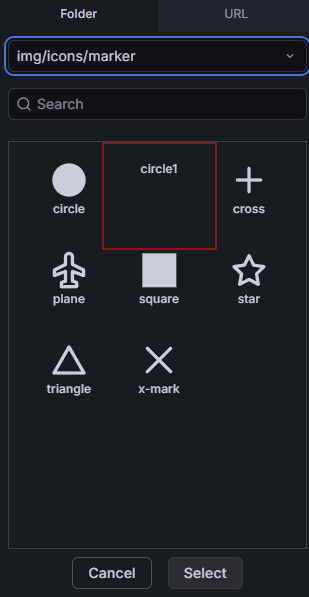
What Grafana version and what operating system are you using?
12.3 on Ubuntu 24.04 LTS
What are you trying to achieve?
Use my custom icon on the Canvas panel. Since a simple SVG file I created was not getting loaded correctly, I went to the basics and attempted using an exact copy of a built-in icon.
(yes, followed the disccusion on creation of a Grafana compatible SVG file with stroke is unset correctly, etc.)
How are you trying to achieve it?
Let’s start with the following to create a copy of an existing icon that ships with Grafana and try using it in the Canvas panel. e.g.
cd /usr/share/grafana/public/img/icons/marker/
sudo cp circle.svg circle1.svg

sudo systemctl restart grafana
What happened?
Attempting to add the copied icon (circle1.svg) to the Canvas panel shows a blank in the icon picker
:3000/api/dashboards/uid/adkv999/public-dashboards:1   Failed to load resource: the server responded with a status of 404 (Not Found)

:3000/api/dashboards/uid/adljqvq/public-dashboards:1   Failed to load resource: the server responded with a status of 404 (Not Found)

:3000/public/build/img/icons/marker/circle1.svg:1   Failed to load resource: the server responded with a status of 404 (Not Found)
Why am I seeing a 404 for circle1.svg? It’s in the exact same location as circle.svg and has the same permissions as circle.svg.
Why is grafana looking in /public/build/img/icons/marker instead of /public/img/icons/marker?
If I place circle1.svg in /public/build/img/icons/marker,in addition to/usr/share/grafana/public/img/icons/marker, the issue is solved.
Definately a bug in the way grafana looks for these files.
IMHO it is not a bug, because doc doesn’t mention that you can load custom icon from the file system. Only load from URL is documented:
Add custom images to elements
You can add custom background images to all elements except Button by referencing an image URL. The image must be hosted at a URL that allows requests from your Grafana instance.
I understand. However, even with disable_sanitize_html=true in grafana.ini, I get this trying to access a copy of a built-in icon from an internal URL. Is there another way to disable the CORS issue within grafana?
Access to fetch at 'http://example.internal:8080/Icons/signal1.svg' from origin 'http://example.internal:3000' has been blocked by CORS policy: No 'Access-Control-Allow-Origin' header is present on the requested resource.

index.mjs:62   GET http://example.internal:8080/Icons/signal1.svg net::ERR_FAILED 404 (File not found)
The internal site is a simple lightweight http service using python -m for testing purposes. This HTTP service is running on the same Ubuntu host as grafana. The file definately exists at this URL, and I can successfully serve Canvas Background images from this URL. It’s icons that are the issue.
Sorry for my english ! I’ve the same problem. My grafana turn on docker and the folder change from /usr/share/grafana/public/img to /usr/share/grafana/public/build/img. To resolve problem i’ve change mount file on my yaml ! I hope this help other users !
The console 404 shows the icon picker looks in /public/build/img/..., not /public/img/.... Put your icon in →
/usr/share/grafana/public/build/img/icons/marker/
On Docker, mount your icon folder under /usr/share/grafana/public/build/img/... instead, as emilie noted. Note the docs only describe loading images from a URL, so this is a workaround.
If you load icons from a URL, the error is on a fetch() request, so the server hosting the icon must send an Access-Control-Allow-Origin header allowing your Grafana origin.