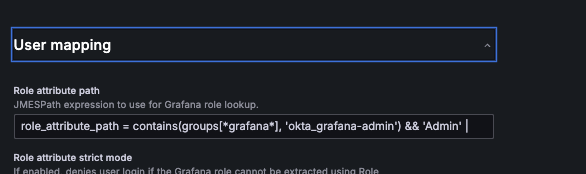
Please bare with me as this is my first time touching Grafana as its needed for team at work.
Ive created the Okta ODIC connector and Im able to log in using the tile in Okta however its not mapping user roles based off the group that Ive added. Ive read the documentation and set up Okta integration through the Grafana UI in through Admin –> Authentication –> okta however every instance of logging in is giving viewer roles. How can I troubleshoot this?
I’m sorry to hear that you’re experiencing difficulties.
Grafana can provide valuable information about certain issues through its own debug logs. These logs can help troubleshoot and identify the root cause of problems (especially if they are related to anything that can be configured via Grafana config file).
[log]
# Either "console", "file", "syslog". Default is console and file
# Use space to separate multiple modes, e.g. "console file"
mode = console file

# Either "debug", "info", "warn", "error", "critical", default is "info"
level = debug
Then restart grafana for the setting to go into effect.
Replicate the problem and check Grafana logs. However, before posting the debug logs on the community forum, it is important to sanitize any private details such as passwords, tokens, IPs, names, … By including properly formatted debug logs (with sanitized information) and details about your installations (e.g. exact Grafana version, how it was installed, OS details, …), you greatly enhance the chances of receiving accurate assistance and solutions.