
EDIT:
Ok, I understand now, but I’ll leave this here for others that have the same problem.
If you click the “Named Capturing Group” link in the Grafana documentation for this transformation, you’ll see that you have to define it something like:
/(?RegexPattern)/
So to get “Tier 1” or “Tier 2” or whatever from my example below, you would put this in the RegExp field of this transformation:
/(?Tier [0-9])/
That will create a column called “Tier” and the value would be the Tier and the number from the short description field.
ORIGINAL POST HERE:
I have a short description field from a ServiceNow Incident query and every value in it always starts with Tier 1/2/3/etc… I want to create a new field from it that just has the Tier 1/2/3/etc… from the beginning.
So, seems simple, right? Use the “Extract fields” transformation with “RegExp” as the Format and “(Tier [0-9])” as the value. But nope. The New field it creates just has the entire short description value in it.
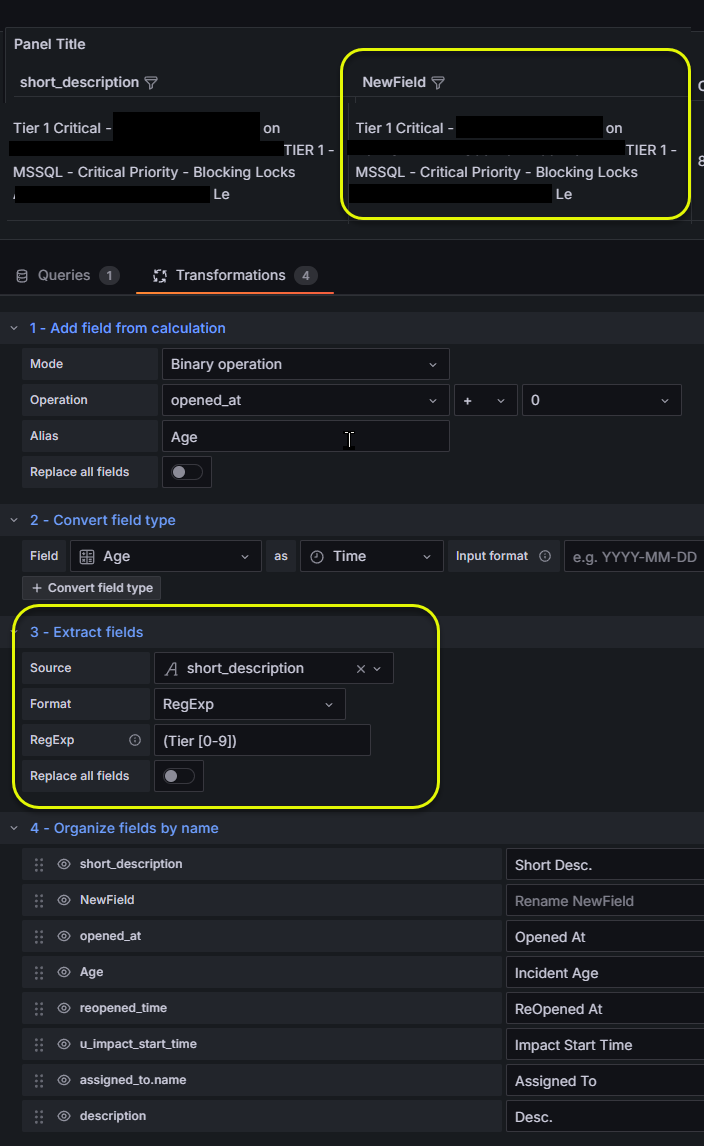
As a matter of fact, no matter what I put in the RegExp box, it just creates a new field with the entire, unedited short description value… I can just put random characters in there and it doesn’t do a thing.

And if I put forward slashes at the beginning and end of the regex expression, then I just get no new field, even if I put in the exact text like “/(Tier 2)/”.
I can take the exact same regex that I put into Grafana in any Regex tester site (like RegEx101 or RegexPal) and it works just fine…
Makes no sense. Is this transformation just broken?
I’m on Grafana 12.0.0