
Hi @mohamed12345,
If you have data from multimeters in csv you can import that into InfluxDB and use it as a datasource.
Import CSV
-
If you format your csv as annotated csv you can directly upload file via InfluxDB UI (
Load Data -> Buckets -> Add data -> CSV upload). In order to format annotated CSV take a look at annotated-csv. -
If you have only few rows you can put your data in query like mentioned at query-a-raw-csv-string (this is for classic CSV with no annotations).
-
Another option is to use CLI like mentioned at influx-write-command and inject-annotation-headers (if you want to specify annotation headers outside csv file). Using
dryrunin next command will only print data to standard output and it will note write data into influxdb. When you are sure that you want to write data use same command withoutdryrun.
influx write dryrun --bucket BucketName --org OrgName --precision ns --format=csv -f /path/to/file.csv
Note: for--precisionuses(seconds) if your data is recorded in seconds.
Shift imported data always to now()
Yes. Here is how you can do that.
Open for more info: Wrong approach with using aligntime function
At first I tought “Well I will just use aligntime function and set alignTo: now() and it will shift data to current time”. Here is an example query of that (wrong) approach:
import "experimental"

from(bucket: "test")
  |> range(start: 2023-02-19T18:15:00Z, stop: 2023-02-19T19:15:00Z) // Here use time range in which you find your original (imported) data
  |> filter(fn: (r) => r["_measurement"] == "cpu")
  |> filter(fn: (r) => r["_field"] == "usage_idle")
  |> filter(fn: (r) => r["cpu"] == "cpu-total")
  |> filter(fn: (r) => r["host"] == "monitoringserver")
  |> experimental.alignTime(alignTo: now())
  |> yield(name: "all_rows")
So, why is this approach wrong? This approach is wrong because it will shift data to now() but the most historical data point from selected range (i.e. data point with timestamp 2023-02-19T18:15:00Z) will be aligned to now() and all other data points will be shifted to future. Because of that you will never be able to compare data that you are continuously collection to InfluxDB and imported data from csv file. Here are pictures:
Wrong approach: Result in InfluxDB:

Wrong approach: Result in Grafana:

Notice that in Grafana I set time range
now-1h to now+1h in order to display data points that are shifted in future.
Correct approach with timeshift() function:
// Original (imported) data
originalData = from(bucket: "test")
  |> range(start: 2023-02-19T18:15:00Z, stop: 2023-02-19T19:15:00Z) // Here use time range in which you find your original (imported) data
  |> filter(fn: (r) => r["_measurement"] == "cpu")
  |> filter(fn: (r) => r["_field"] == "usage_idle")
  |> filter(fn: (r) => r["cpu"] == "cpu-total")
  |> filter(fn: (r) => r["host"] == "monitoringserver")
  |> yield(name: "all_rows")

// Select only last row from originalData
// https://docs.influxdata.com/influxdb/v2.6/query-data/flux/scalar-values/#extract-a-row
lastRow = originalData
  |> last()
  |> findRecord(fn: (key) => true, idx: 0) // Since we filtered data in originalData variable here we can use (key) => true. idx = 0 selects first (only) row

// Calculate duration between now and time of last row from original data
// https://docs.influxdata.com/influxdb/cloud/query-data/flux/operate-on-timestamps/#calculate-the-duration-between-two-timestamps
timeDifferenceDuration = duration(v: uint(v: now()) - uint(v: lastRow._time)) // UTC timestamps needs to be converted in UNIX/epoch timestamp with uint(). lastRow._time selects _time column from lastRow variable.

// Shift data so that last row from originalData is aligned to current time (now)
// https://docs.influxdata.com/flux/v0.x/stdlib/universe/timeshift/
shiftedData = originalData
  |> timeShift(duration: timeDifferenceDuration, columns: ["_time"])
  |> yield(name: "result")
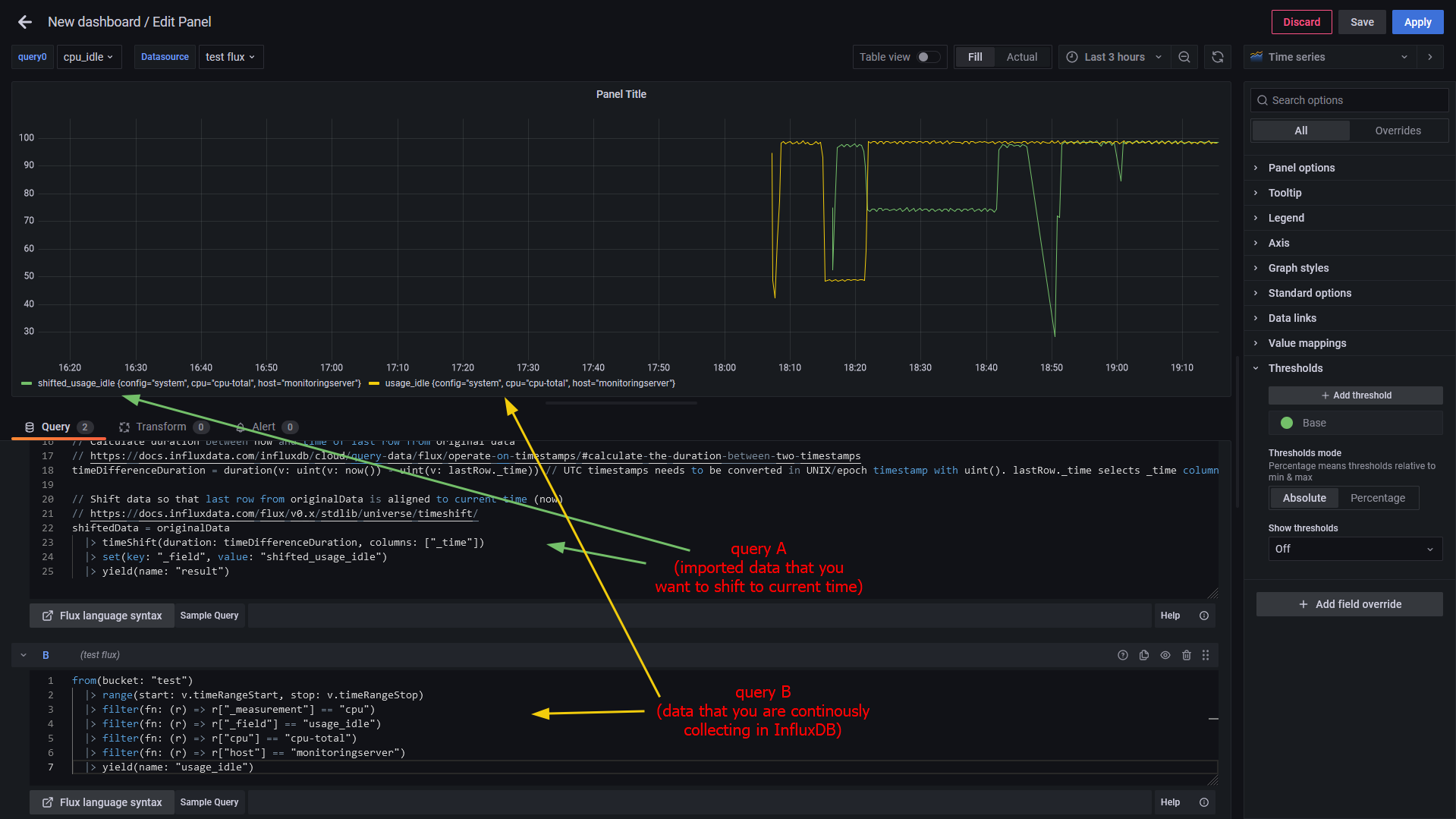
Result in InfluxDB:

Last row of original data refers to the newest data point from imported data (i.e. 2023-02-19T19:15:00Z). Note that newest data point is now aligned to
now() (not the oldest like in wrong approach).
Result in Grafana:
Best regards,
ldrascic